SiFive Freedom Build Method: Bitstream Creation for Arty-A7 – Caravel SoC
Version: 2025/02/20
Table of Contents:
What is SiFive Freedom?
Freedom’s Positioning:
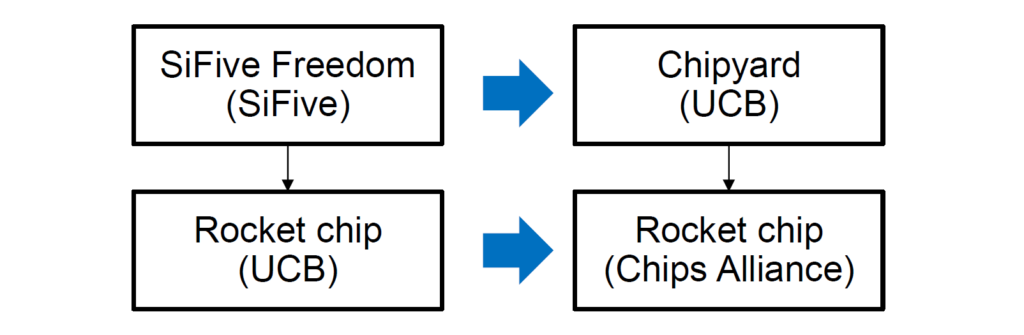
Challenges in Building Freedom:
Countermeasures:
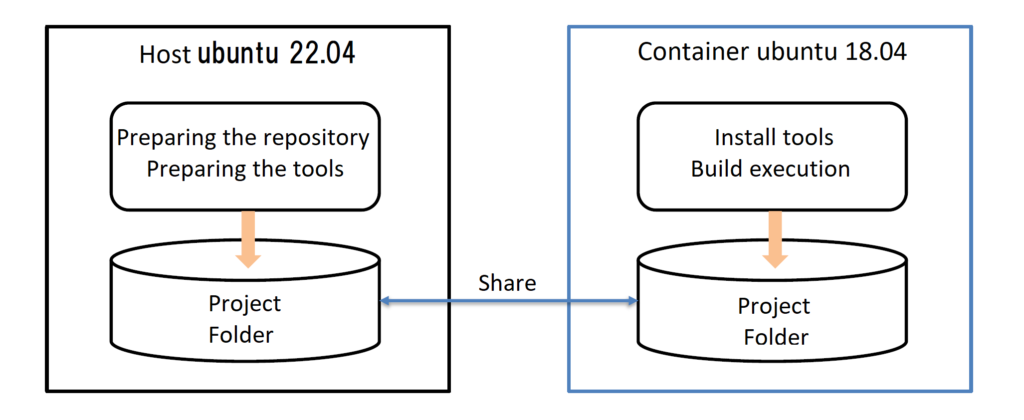
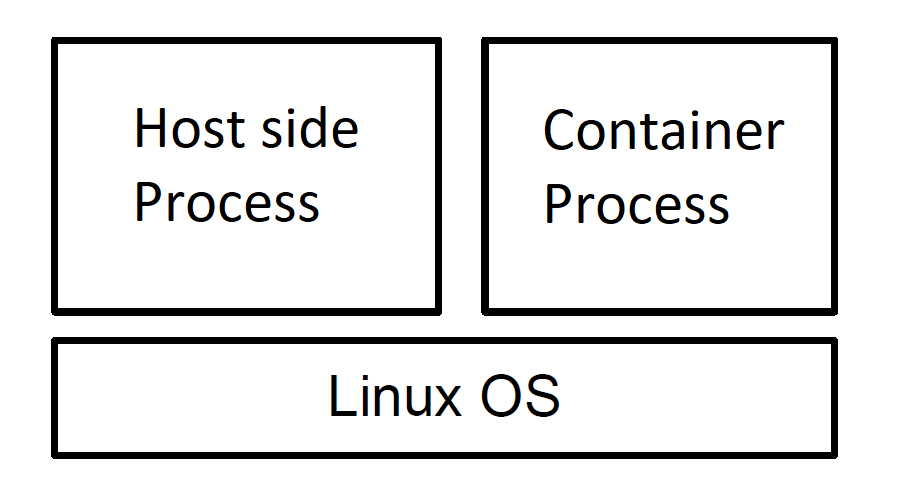
Docker on Wikipedia : https://ja.wikipedia.org/wiki/Docker
In the case of Docker, virtualization is performed on Linux.
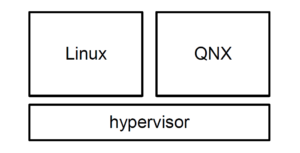
In the case of a hypervisor, the OS itself is virtualized
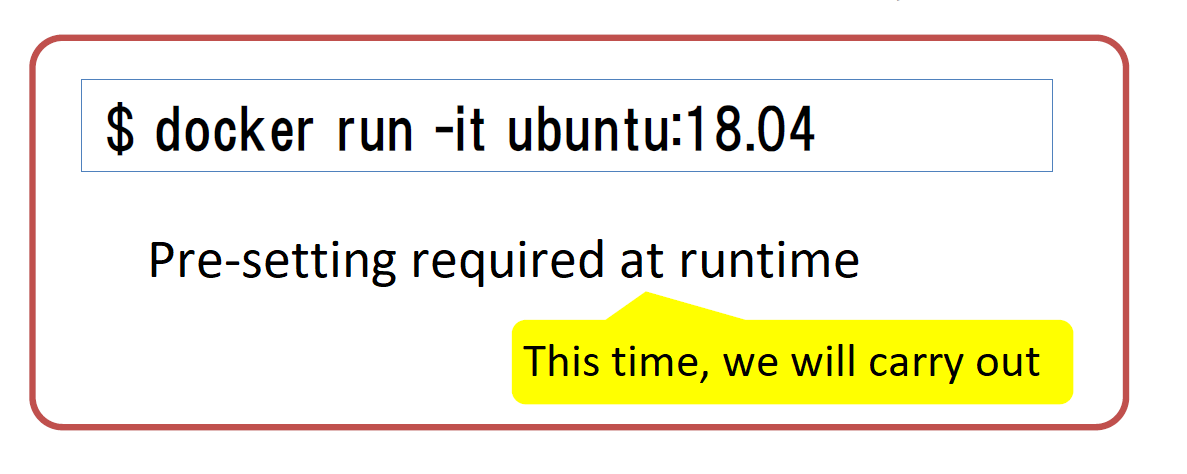
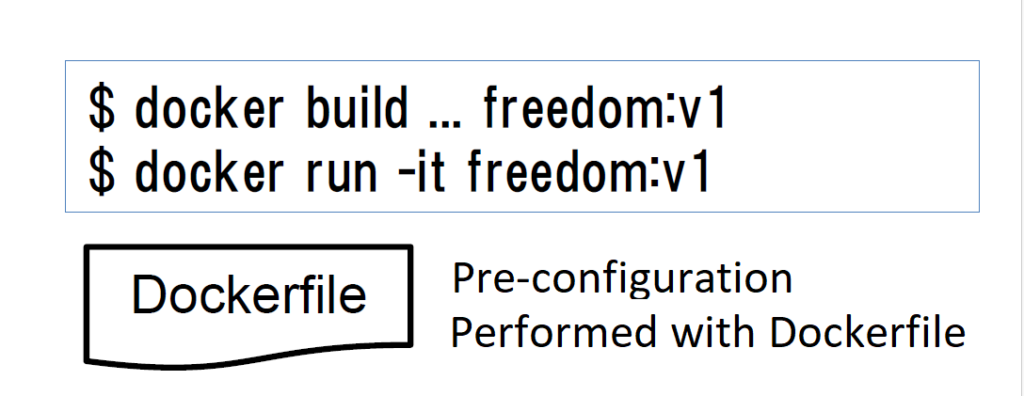
How to use docker (whether or not Dockerfile is used)
Using the official ubuntu image as is
Building and using Dockerfile
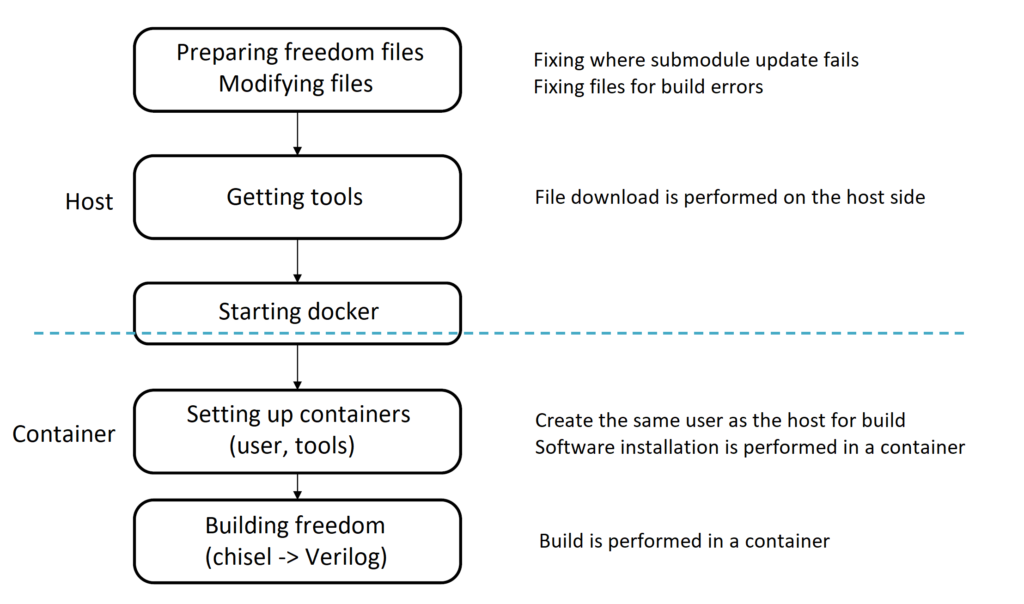
Procedure
Obtaining via git clone:
git clone https://github.com/sifive/freedom.git
Expanding submodule → Error occurs
cd freedom
git submodule update --init --recursive
Where the error occurs
git submodule status --recursive
-65cc4d2748a2c2e6f2... rocket-chip/riscv-tools/riscv-gnu-toolchain/riscv-qemu/dtc
-87eea99e443b389c97... rocket-chip/riscv-tools/riscv-gnu-toolchain/riscv-qemu/pixman
-e3d05727a074619fc1... rocket-chip/riscv-tools/riscv-gnu-toolchain/riscv-qemu/roms/SLOF
-04186319181298083e... rocket-chip/riscv-tools/riscv-gnu-toolchain/riscv-qemu/roms/ipxe
-c5542f226c0d3d61e7... rocket-chip/riscv-tools/riscv-gnu-toolchain/riscv-qemu/roms/openbios
-c559da7c8eec5e45ef... rocket-chip/riscv-tools/riscv-gnu-toolchain/riscv-qemu/roms/openhackware
+99d9b4dcf27d7fbcba... rocket-chip/riscv-tools/riscv-gnu-toolchain/riscv-qemu/roms/qemu-palcode (heads/master)
-e2fc41e24ee0ada60f... rocket-chip/riscv-tools/riscv-gnu-toolchain/riscv-qemu/roms/seabios
-23d474943dcd55d055... rocket-chip/riscv-tools/riscv-gnu-toolchain/riscv-qemu/roms/sgabios
-2072e7262965bb48d7... rocket-chip/riscv-tools/riscv-gnu-toolchain/riscv-qemu/roms/u-boot
-19ea12c230ded95928... rocket-chip/riscv-tools/riscv-gnu-toolchain/riscv-qemu/roms/vgabios
URL changes
rocket-chip/riscv-tools/riscv-gnu-toolchain/riscv-qemu/.gitmodules
Update again after changing URL
git submodule sync –recursive
git submodule update --init --recursive
Fixing files that cause build errors Target files:
rocket-chip/firrtl/project/plugins.sbt
rocket-chip/chisel3/project/plugins.sbt
Correction content:
Delete the first line below (Reason: An error occurs because the URL is invalid)
resolvers += Resolver.url("scalasbt", new
URL("http://scalasbt.artifactoryonline.com/scalasbt/sbt-plugin-releases"))
(Resolver.ivyStylePatterns)

resolvers += Classpaths.sbtPluginReleases

resolvers += "jgit-repo" at "http://download.eclipse.org/jgit/maven"

addSbtPlugin("org.scalastyle" %% "scalastyle-sbt-plugin" % "1.0.0")

addSbtPlugin("org.scoverage" % "sbt-scoverage" % "1.5.1")

...
Necessary Tools:
| Name | version | Description |
|---|---|---|
| sbt | 1.2.1 |
Required for Chisel build. Version identification: Search for a version compatible with scala 2.12.4 |
| Java (openjdk) | 11 |
Required version listed on Scala documentation. https://docs.scala-lang.org/overviews/jdk-compatibility/overview.html In Ubuntu 18.04, openjdk-11 can be obtained with apt-get |
| verilator | 3.922 |
For Verilog simulation. Version identification: described in README.md |
| RISC-V toolchain | 10.2.0 |
Latest version of SiFive’s toolchain. https://github.com/sifive/freedom-tools/releases |
Identify the sbt version using the following procedure
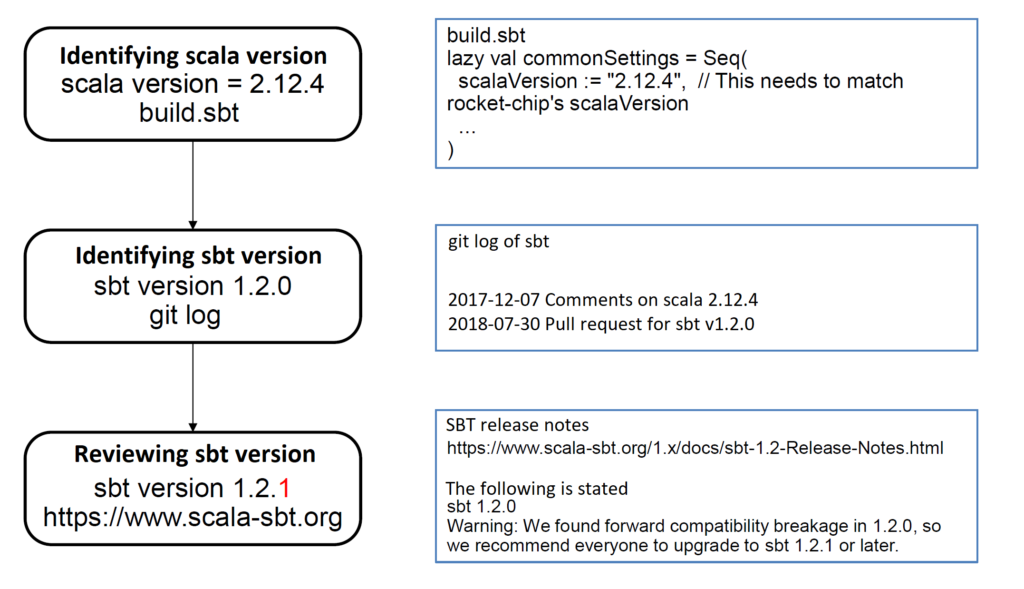
How to get sbt
Add sbt repository to apt source list
sudo apt-get update
echo "deb https://repo.scala-sbt.org/scalasbt/debian all main" | sudo tee /etc/apt/sources.list.d/sbt.list
echo "deb https://repo.scala-sbt.org/scalasbt/debian /" | sudo tee /etc/apt/sources.list.d/sbt_old.list
curl -sL "https://keyserver.ubuntu.com/pks/lookup?op=get&search=0x2EE0EA64E40A89B84B2DF73499E82A75642AC823" | ¥
sudo -H gpg --no-default-keyring --keyring gnupg-ring:/etc/apt/trusted.gpg.d/scalasbt-release.gpg --import
sudo chmod 644 /etc/apt/trusted.gpg.d/scalasbt-release.gpg
sudo apt-get update
Download a specific version of sbt
apt-get download sbt=1.2.1
Getting verilator
Preparing files
git clone https://github.com/verilator/verilator
Check out v3.922
cd verilator
git checkout -b verilator_3_922 v3.922Getting the RISC-V toolchain
SiFive Freedom tool chain
https://github.com/sifive/freedom-tools/releases
Getting the December 2020 Tools Release
wget https://static.dev.sifive.com/dev-tools/freedom-tools/v2020.12/riscv64-
unknown-elf-toolchain-10.2.0-2020.12.8-x86_64-linux-ubuntu14.tar.gz
Extract to the appropriate folder (below the directory shared with the container))
tar xzf riscv64-unknown-elf-toolchain-10.2.0-2020.12.8-x86_64-linuxubuntu14.
tar.gz –c <Directories accessible from container>Starting the container (1) Prerequisites
| <user> | User account (must be in sudo and docker groups) |
| <project> | Project name |
| <group> | Group to which the user belongs |
| <uid> | User’s user id <uid>is obtained with “id -u” |
| <gid> | User group id <gid>is obtained with “id –g” |
Shared folder configuration.
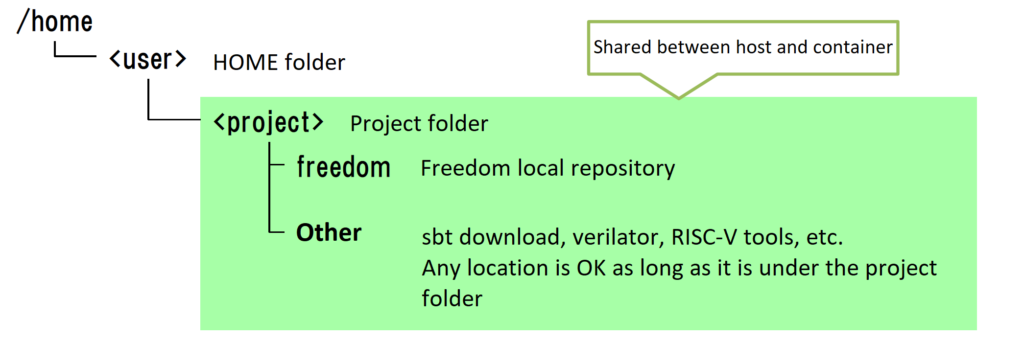
Launch docker from the project folder.
cd /home/<user>/<project>
docker run –it –v $PWD/$PWD ubuntu:18.04 /bin/bash
| Parameters | Meaning |
|---|---|
| docker run | Starting the docker container |
| -it | i: interactive t: tty |
| -v $PWD:$PWD | Container and host/home/<user>/<project>Share |
| ubuntu:18.04 | Starting Ubuntu 18.04LTS (download from docker hub) |
| /bin/bash | /bin/Start bash |
Getting the required apps (run as root below)
apt-get update
apt-get install -y sudo ca-certificates curl wget locales
<user> Creating (giving sudo privileges)
groupadd -g <gid> <group>
useradd -g<gid> -m -s /bin/bash -u <uid> <user>
usermod -G sudo <user>
echo '%sudo ALL=(ALL) NOPASSWD:ALL' >> /etc/sudoers
<user> Changed
su <user>
Installing sbt (the following is handled with user privileges)
cd <sbt download location>
sudo dpkg –i sbt_1.2.1_all.deb
Installing packages required for sbt (not sure if all of the following are required)
sudo apt-get install –y openjdk-11-jdk git scala device-tree-compiler
sudo apt-get install -y autoconf automake autotools-dev bison flex build-essential
sudo apt-get install -y bc gawk texinfo gperf libtool patchutils python pkg-config
sudo apt-get install -y libmpc-dev libmpfr-dev libgmp-dev zlib1g-dev libexpat-dev
Building and installing verilator
cd <Verilator local repository>
unset VERILATOR_ROOT
autoconf
./configure
make
sudo make install
RISC-V toolchain path settings
cd <Parent directory of RISC-V toolchain>
export RISCV=$PWD/riscv64-unknown-elf-toolchain-10.2.0-2020.12.8-x86_64-linux-ubuntu14
PATH=$PATH:$RISCV/bin
Pre-executing sbt
cd /home/<user>/<project>/freedom
sbt
sbt:freedom> exit
Executing make
make -f Makefile.e300artydevkit verilogCreation policy
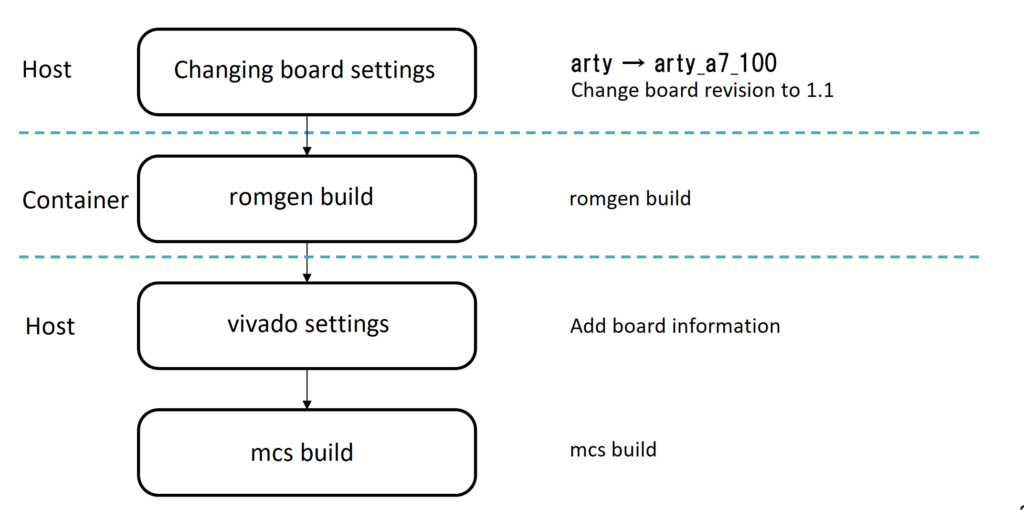
Change according to your board information
Changed board from arty to arty_a7_100
diff --git a/Makefile.e300artydevkit b/Makefile.e300artydevkit
index 110c08a..3476a60 100644
--- a/Makefile.e300artydevkit
+++ b/Makefile.e300artydevkit
@@ -6,7 +6,7 @@ MODEL := E300ArtyDevKitFPGAChip
PROJECT := sifive.freedom.everywhere.e300artydevkit
export CONFIG_PROJECT := sifive.freedom.everywhere.e300artydevkit
export CONFIG := E300ArtyDevKitConfig
-export BOARD := arty
+export BOARD := arty_a7_100
Change board version to 1.1 (folder fpga-shells)
diff --git a/xilinx/arty_a7_100/tcl/board.tcl b/xilinx/arty_a7_100/tcl/board.tcl
index 70635da..552d70f 100644
--- a/xilinx/arty_a7_100/tcl/board.tcl
+++ b/xilinx/arty_a7_100/tcl/board.tcl
@@ -1,5 +1,5 @@
# See LICENSE for license details.
set name {arty-a7-100}
set part_fpga {xc7a100ticsg324-1L}
-set part_board {digilentinc.com:arty-a7-100:part0:1.0}
+set part_board {digilentinc.com:arty-a7-100:part0:1.1}
romgen build from container side
make -f Makefile.e300artydevkit romgen
Check if arty-a7-100 is included in the Vivado environment (1) Start in tcl mode
vivado –mode tcl
(2) Get board information with get_board_parts
xhub::refresh_catalog [xhub::get_xstores xilinx_board_store]
get_port_parts
...
digilentinc.com:arty-a7-100:part0:1.0 digilentinc.com:arty-a7-100:part0:1.1 ...
Red: If you have arty-a7-100 -> End here
(3) Add arty-a7-100 to board information
If you do not have arty-a7-100 -> Add this
xhub::install [xhub::get_xitems "*arty-a7*"]
Now, close vivado for now
(4) Settings at vivado startup
The added board information is installed in the home directory, so it needs to be set when vivado starts
echo ¥
  “set_param board.repoPaths [get_property LOCAL_ROOT_DIR [xhub::get_xstores xilinx_board_store]]” ¥
  >>~/.Xilinx/Vivado/2024.1/Vivado_init.tcl
(5) Reconfirming board information
Restart vivado and execute the following
get_port_parts
Confirm that arty-a7-100 has been added
mcs build
make -f Makefile.e300artydevkit mcsCopyright © Japan Embedded Systems Technology Association All Rights Reserved.



